Log in
WhatsApp Business using Clientify

12 clicks
¡Widget Test automated!
sss
12 clicks
¡Widget Test automated!
sss
12 clicks
¡Widget Test automated!
sss
12 clicks
¡Widget Test automated!
sss
12 clicks
¡Widget Test automated!
sss
12 clicks
¡Widget Test automated!
sss
11 clicks
¡Widget Test automated!
sss
11 clicks
¡Widget Test automated!
sss
10 clicks
¡Widget Test automated!
sss
8 clicks
alfonsoychristian
¿Cómo puedo ayudarte?
Education
8 clicks
Switch 345
Hola, ¿cómo podemos ayudarte?
Other
8 clicks
alfonsoychristian
¡Únete al webinar!
Education
Previous
1
…
28
29
30
31
(current)
32
33
34
…
54
Next
Add the widget on your website
1. Copy this code
Your widget code
Copy code
Copied to clipboard
or your Key Number (
Learn how to add your Widget to your Wordpress website
)
Copy key number
Copied to clipboard
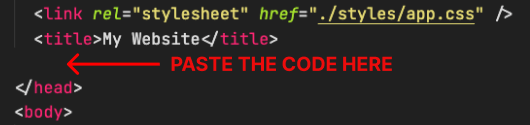
2. Paste the code
Place the code just before the </head> tag in the HTML of your website