Log in
WhatsApp Business using Zoho
14 clicks
ChatWith.io
Use ChatWith.io's Widget for making bookings
Agency / SEO / Design
14 clicks
¡Widget Test automated!
sss
14 clicks
¡Widget Test automated!
sss
14 clicks
¡Widget Test automated!
sss
14 clicks
Planifica En Paz
Bienvenido a Planifica En Paz
Insurance
14 clicks
beliquid (New)
Estamos aquí para ayudarte con tu evento. Hable...
Agency / SEO / Design
14 clicks
¡Widget Test automated!
sss
14 clicks
Dominet
Renovaciones
Agency / SEO / Design
13 clicks
Landing tests
xxx
Agency / SEO / Design
13 clicks
Number test
no
Agency / SEO / Design
13 clicks
¡Widget Test automated!
sss
13 clicks
¡Widget Test automated!
sss
Previous
1
…
44
45
46
47
(current)
48
49
50
…
76
Next
Add the widget on your website
1. Copy this code
Your widget code
Copy code
Copied to clipboard
or your Key Number (
Learn how to add your Widget to your Wordpress website
)
Copy key number
Copied to clipboard
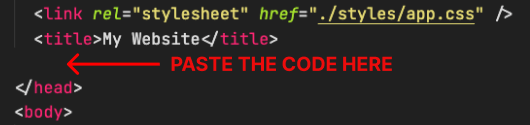
2. Paste the code
Place the code just before the </head> tag in the HTML of your website