Log in
WhatsApp Business using Zoho

13 clicks
¡Widget Test automated!
sss
13 clicks
¡Widget Test automated!
sss
13 clicks
¡Widget Test automated!
sss
13 clicks
¡Widget Test automated!
sss
13 clicks
¡Widget Test automated!
sss
13 clicks
Ilerna TEST meta tags
Contactar por WhatsApp
Education
13 clicks
My Widget
Use our WhatsApp account for support and sales
13 clicks
¡Widget Test automated!
sss
13 clicks
Route block
test
Agency / SEO / Design
13 clicks
Alberto | Vivara
Vivara - Zaragoza
Real Estate
13 clicks
¡Widget Test automated!
sss
13 clicks
Test subform
Test
Agency / SEO / Design
Previous
1
…
45
46
47
48
(current)
49
50
51
…
76
Next
Add the widget on your website
1. Copy this code
Your widget code
Copy code
Copied to clipboard
or your Key Number (
Learn how to add your Widget to your Wordpress website
)
Copy key number
Copied to clipboard
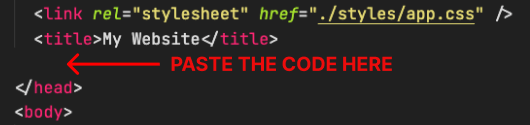
2. Paste the code
Place the code just before the </head> tag in the HTML of your website